Tessera Viz
PX-02
Quantum Viz
See every step of a quantum algorithm.
An exact simulator, pictures of every step and explanations in plain words. 18 ready algorithms in the free edition; 3 more in Pro.
01
What it is
09
Tessera Viz · Quantum
A qubit that makes sense the first time you see one.
Quantum Viz simulates a circuit exactly and keeps the state after every step, so each gate is one visible step: the circuit, the state and the Bloch spheres move together, and every step is explained in plain words. It has no dependencies, and every picture is a plain SVG string, so it works in Node, in the browser, in print and under a strict Content-Security-Policy.
18
Free algorithms
3
Pro algorithms
16
Qubits, simulated exactly
0
Runtime dependencies
02
The views
09
One state, seen every way it can be.
Every picture below was drawn by Quantum Viz on our machine, from the same runs as the demo.
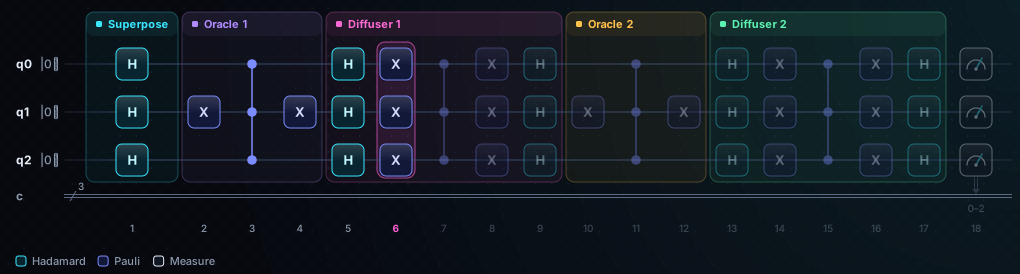
Circuit
Gates by stage, the current step lit · Grover search
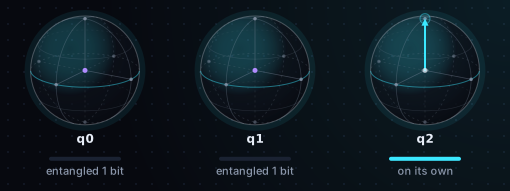
Bloch spheres
One sphere per qubit · GHZ state
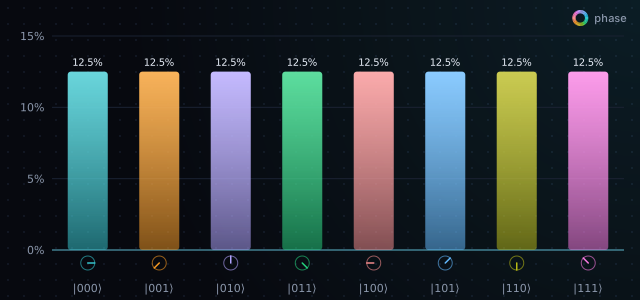
State bars
Height is odds, colour is phase · Quantum Fourier transform
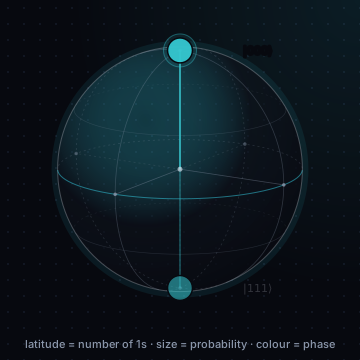
Q-sphere
Every outcome is a point · GHZ state
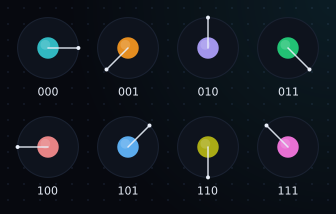
Phase disks
Area is odds, needle is phase · Quantum Fourier transform
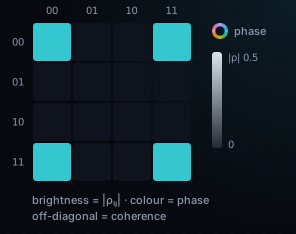
Density matrix
The interference terms, as a map · Bell state
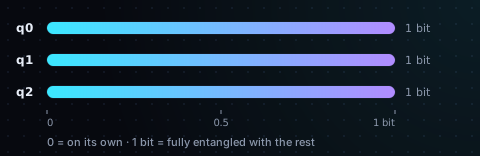
Entanglement
Per qubit, in bits · GHZ state
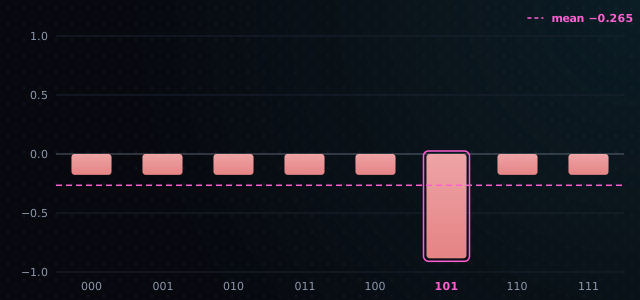
Signed bars
Grover's inversion about the mean · Grover search
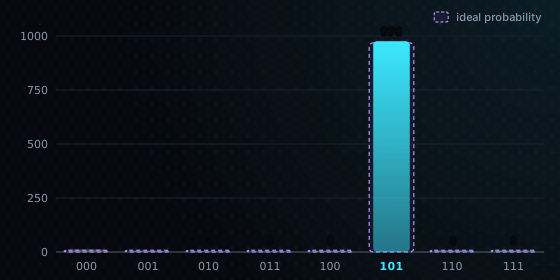
Histogram
1,024 runs against the ideal odds · Grover search
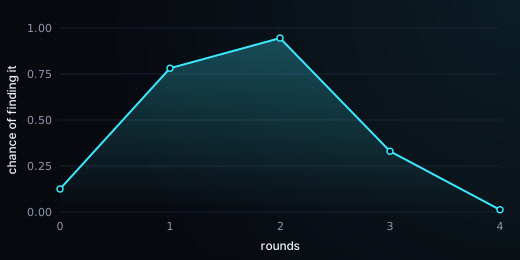
Success curve
Odds of the answer, per Grover round · Grover search
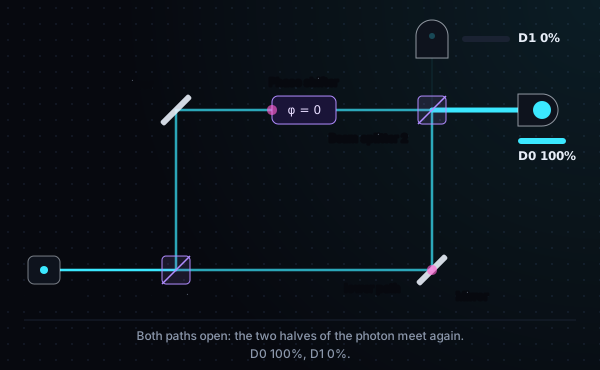
Interferometer
Mach–Zehnder: one photon, two paths · Mach–Zehnder interferometer
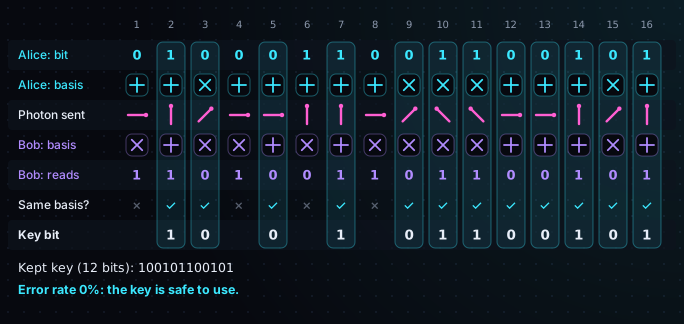
BB84 timeline
A key exchange, photon by photon · BB84 key exchange
03
Explained
09
Every step, in three depths.
01
Simple
Plain words, and an everyday picture for each algorithm: flip every coin into the air at once.
02
Detailed
The state before and after the gate, and how the odds of each outcome change.
03
Expert
The matrices, the Bloch vectors and the entropy of each qubit.
04
A result line
Each algorithm ends with one sentence computed from the run itself, such as how much the marked item gained after two Grover rounds.
04
The algorithms
09
18 free, 3 in Pro.
Group | Algorithms | Tier |
|---|---|---|
Basics | Superposition, Bell state, GHZ state, W state, Mach–Zehnder interferometer (phase, path marker) | Free |
Communication | Quantum teleportation, superdense coding, BB84 key exchange (photons, Eve, seed) | Free |
Oracles | Phase kickback, Deutsch–Jozsa, Bernstein–Vazirani, Simon's algorithm | Free |
Search | Grover search (any marked items, the best number of rounds, the success curve) | Free |
Fourier | Quantum Fourier transform (and its inverse), phase estimation | Free |
Tests | Swap test, Hadamard test | Free |
Error correction | Bit-flip code | Free |
Pro | Shor's order finding (factoring 15), VQE for the H₂ energy, QAOA MaxCut with its γ/β landscape | Pro |
← Swipe for the rest of the table →
← Drag for the rest of the table →
05
The explorer
09
One tag gives you the whole explorer.
<script type="module">import "@tesserify/quantum/element";</script>

<tx-quantum algorithm="grover" autoplay></tx-quantum>
<tx-quantum algorithm="bernstein-vazirani" depth="detailed"></tx-quantum>

// React (Vue and Angular wrappers work the same way)
import { QuantumView, QuantumExplorer } from "@tesserify/quantum-react";

<QuantumExplorer algorithm="grover" autoplay />
<QuantumView kind="bloch" state={pairs} order="msb" theme="css" />
Views: amplitudes, bloch, disks, qsphere, outcomes, density, entanglement, plot. Depths: simple, detailed, expert. Themes: tessera, light, print, contrast. Keyboard: arrows step, Space plays and pauses, Home and End jump.
06
How it works
09
How it fits into your app.
01
The <tx-quantum> explorer
One element: pick an algorithm or pass your own circuit as JSON, choose the view, the depth and the theme. Click a circuit column to go to that step; hover a gate for its name, its matrix and its meaning.
02
React, Vue and Angular
@tesserify/quantum-react, -vue and -angular each give a QuantumView (any picture) and a QuantumExplorer (the full explorer). The core package has no framework import.
03
Mount in any framework
mount() draws any kind of picture into an element and updates it at most once per animation frame, so it is safe to feed at 60 fps.
04
Pictures you can touch
A Bloch sphere you drag with a mouse, a finger, a pen or the keys, and a circuit editor with undo and redo whose state view updates as you build.
05
Your own views
An animation framework (createPlayer) moves amplitudes the short way round the phase wheel and Bloch arrows along the sphere. With reduced motion, steps change at once.
06
Your design system
Four themes (tessera, light, print, contrast), any part overridable, and a colour-blind-safe phase wheel in print and contrast. Theme colours can come from CSS variables on a parent element.
07
Tiers
09
What is free, and what is Pro.
Tier | Package | What you get |
|---|---|---|
Free (Community) | @tesserify/quantum, quantum-react, quantum-vue, quantum-angular | The exact simulator, every picture, the three-depth explanations, the 18 algorithms, the <tx-quantum> explorer, the interactive Bloch sphere and circuit editor, and the animation framework. |
Pro | @tesserify-pro/quantum-pro | Shor, VQE and QAOA. registerProQuantumAlgorithms() checks a Pro licence, then adds them to the same explorer. |
← Swipe for the rest of the table →
← Drag for the rest of the table →
08
Where it stops
09
What it won't do.
01
More than 16 qubits
The simulator is exact, which is why it stops at 16 qubits.
02
One random run
Measurement is deferred: the pictures show the odds of each outcome, and seeded sampling gives counts when you want them.
09
Where next
09